

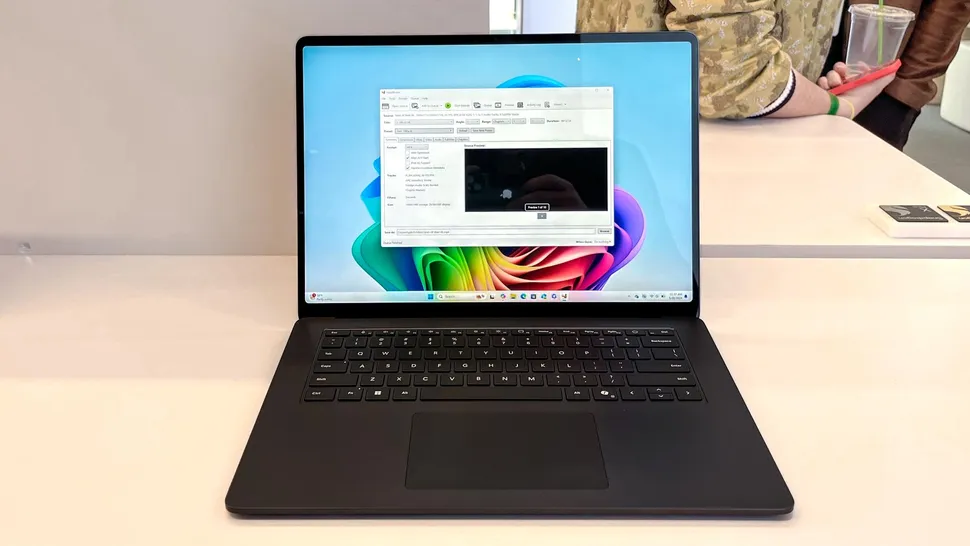
Buying a new Windows laptop used to mean checking the processor, RAM, storage, screen, and battery. Now there is another label on the box, and it can be easy to misunderstand. The Copilot Plus PC label means the laptop has hardware built for local AI features, not only access to the Copilot app. For U.S. shoppers comparing back-to-school, work-from-home, or small-business laptops, the short answer is clear: look for a 40 TOPS NPU, 16GB RAM, at least 256GB storage, and a supported chip family such as Snapdragon X, Intel Core Ultra 200V or 300V, or AMD Ryzen AI 300 or 400. Microsoft lists these as part of the current hardware standard for Copilot+ PCs.
That sounds neat on paper. In a store, it gets messier. Some laptops say “AI PC” but do not qualify. Some have a Copilot key but miss the local AI hardware. A buyer reading clear technology news for everyday decisions needs the boring truth before the shiny pitch. The right laptop is not the one with the loudest sticker. It is the one whose processor, memory, storage, and software line up with what Windows actually needs.
Why the Label Matters More Than the Sticker
The AI laptop market has a naming problem. “AI-ready,” “AI enhanced,” and “Copilot capable” can all sound close to the same thing, yet they do not mean the same thing when you are spending $900, $1,200, or more. A normal Windows 11 PC can still open Microsoft Copilot through the cloud. That does not make it part of the newer class of Windows AI laptops built for on-device features.
The NPU Is the Gatekeeper, Not the Keyboard Key
The key detail is the NPU, short for neural processing unit. It is a separate part of the chip made to handle AI tasks without leaning on the CPU or GPU for every request. Microsoft’s public requirement calls for an NPU capable of 40+ TOPS, along with 16GB of DDR5 or LPDDR5 memory and 256GB of SSD or UFS storage.
That 40 TOPS NPU number matters because it separates real local AI hardware from vague laptop marketing. A system can be fast for spreadsheets, browser tabs, and streaming, yet still fall short if its NPU is too weak. That is the part many buyers miss.
Here is the counterintuitive part: a more expensive older laptop can fail the test while a thinner newer model passes. A discounted premium Intel laptop from 2023 may feel faster in normal use than a newer entry model, but it will not unlock the same Windows AI features if the NPU is below the line.
Why 16GB RAM Is the New Safe Floor
For years, budget Windows laptops shipped with 8GB RAM and felt acceptable for school, email, and light office work. That era is ending for this class of machine. Microsoft’s requirement makes 16GB the entry point, not a luxury upgrade.
That does not mean every 8GB laptop is useless. It means it is not the right pick if you want the new local AI feature set. A student in Ohio buying a laptop for essays and Zoom may survive with 8GB. A buyer who wants Live Captions, smarter search, Recall support, and longer useful life should not treat 16GB as optional.
Storage deserves the same clear thinking. The minimum is 256GB, but 512GB is the saner choice for most people. Windows updates, photos, school files, browser cache, OneDrive sync, and AI features all eat space faster than shoppers expect. For a Windows laptop buying guide, that one upgrade may matter more than a brighter logo on the lid.
Copilot Plus PC Requirements That Actually Matter in Daily Use
The spec sheet gives you the floor. Daily use shows whether that floor feels solid. A laptop can meet the rule and still be the wrong buy for your job, your apps, your school, or your travel routine. That is why the smart move is to read the standard as a filter, then judge the laptop like a normal machine.
Processor Families That Pass the Test
Microsoft currently names Snapdragon X series, AMD Ryzen AI 300 and 400 series, and Intel Core Ultra 200V and 300V series as compatible processor groups for these systems. That is the cleanest way to shop without reading every chip suffix in a panic.
Snapdragon X laptops were the first big wave. They are strong on battery life and quiet daily work. Many feel close to a MacBook Air in the way they wake, sleep, and stretch a charge. The catch is app behavior. Most mainstream apps run fine now, but some older Windows tools, VPN clients, drivers, games, and niche work programs may still prefer Intel or AMD.
Intel Core Ultra 200V and AMD Ryzen AI models are the safer lane for buyers who want local AI features without leaving the classic x86 Windows app world. If you use accounting software, printer tools, older plug-ins, or business apps built years ago, that comfort can matter. Quiet confidence beats drama.
Why “AI PC” Can Still Be Too Vague
Retail pages are not always written for clarity. One product card may say “AI laptop” because it has a Copilot key. Another may say it because the webcam has background blur. A third may meet the full standard. Those three machines should not be treated as equal.
A real-world example helps. Microsoft’s own shopping page lists current models such as Microsoft Surface Pro 12-inch, Samsung Galaxy Book5 360 15, Microsoft Surface Pro 13-inch, and Dell 16 Plus under Copilot+ PC listings. Those product names are easier to trust when paired with the correct processor, memory, and storage. The label alone is not enough.
The safer shopping habit is simple: check the chip name, RAM, storage, and Windows version before caring about the marketing line. Microsoft says Windows 11 version 24H2 or newer is part of the consumer system requirement in its explainer. If the seller hides the processor or memory, skip that listing.
Which Laptops Actually Meet the Standard
The laptop list keeps growing, so no article should pretend it can freeze the market forever. What matters more is knowing the families and the common models that fit. In the U.S., you will see qualifying systems from Microsoft, Dell, HP, Lenovo, Samsung, Acer, and ASUS, but each brand also sells machines that do not qualify. Same logo. Different story.
Surface, Dell, Samsung, HP, Lenovo, Acer, and ASUS Models to Watch
Microsoft’s launch wave included partner machines such as Acer Swift 14 AI, ASUS Vivobook S 15, Dell XPS 13, Dell Inspiron 14 Plus, Dell Inspiron 14, Dell Latitude 7455, Dell Latitude 5455, HP OmniBook X, HP EliteBook Ultra G1q, Lenovo Yoga Slim 7x, Lenovo ThinkPad T14s Gen 6, and Samsung Galaxy Book4 Edge. Microsoft described those systems during the first Copilot+ PC rollout.
That list is useful, but you still need to check configuration. A Dell XPS 13 with a qualifying Snapdragon X chip is not the same as every XPS 13 ever sold. A ThinkPad T14s Gen 6 with the right chip and memory belongs in the class. An older ThinkPad with similar branding may not.
Surface models are the easiest for many shoppers to understand because Microsoft sells them under its own roof. Surface Pro and Surface Laptop configurations with supported chips, 16GB or more memory, and enough storage can meet the standard. For tablet-style work, Surface Pro makes sense. For typing all day, Surface Laptop feels calmer.
Best Fits by Buyer Type
For college students, a 13- or 14-inch model with 16GB RAM and 512GB storage is the sweet spot. Snapdragon X laptops can be a good fit when battery life matters more than old software support. That means lecture notes, browser work, Microsoft 365, streaming, and light photo edits.
For small-business users, Intel Core Ultra or AMD Ryzen AI systems may be the better bet. They give you the new Windows AI laptop features while keeping wider app comfort. A real estate agent in Phoenix, a bookkeeper in Tampa, or a contractor in Dallas may care less about benchmark charts and more about printers, scanners, PDF tools, and client software working without fuss.
For creators, the answer depends on the work. Photo editing and light video are fine on many systems. Heavy 4K timelines, 3D work, and gaming need more than the label. You may need a stronger GPU, more memory, and a bigger SSD. A sticker cannot save an underpowered build.
How to Shop Without Paying for the Wrong Promise
The best laptop choice is rarely the flashiest one. It is the machine that matches your work, your software, and your patience. For this new class, the mistake is paying extra for local AI features you will never use, or buying too cheap and missing the standard by one hidden spec.
The Five-Point Store Check
Use this quick check before checkout:
- The processor must be Snapdragon X, AMD Ryzen AI 300 or 400, or Intel Core Ultra 200V or 300V.
- The NPU must be rated at 40 TOPS or higher.
- RAM must be 16GB or more.
- Storage must be at least 256GB, though 512GB is a safer floor.
- The laptop should run Windows 11 version 24H2 or newer.
That list catches most traps. It also protects you from vague retailer pages. A laptop with 8GB RAM may still be a fine low-cost Windows device, but it does not belong in this buying lane.
Recall adds another wrinkle. Microsoft says Copilot+ PCs need at least 256GB hard drive capacity and 50GB free for Recall to operate, with 25GB allocated by default on a 256GB PC. Microsoft also says Recall is off by default and needs Windows Hello Enhanced Sign-in Security with biometric proof of presence. This is why storage and privacy settings are not side details.
When You Should Wait Instead of Buy
Waiting can be the smartest purchase decision. If your current laptop is two years old and runs your apps well, the new label may not change your life yet. The first wave of any hardware category carries early pricing, uneven messaging, and a few features that take time to mature.
You should buy now if you need a laptop anyway, want longer battery life, and care about local AI tools. You should wait if your main apps are older, your budget is tight, or the laptop you want is only available in a weak storage setup. A good discount on the wrong machine is still the wrong machine.
For a home office, think past the laptop itself. A better webcam, dock, monitor, and keyboard may improve your day more than local AI features. That is why pairing the right computer with a home office laptop setup can beat buying a premium machine and using it badly.
Conclusion
The new Windows laptop label is useful, but only when you read it with a calm eye. A real qualifying machine needs the right NPU, enough memory, enough storage, and a supported chip family. The label should help you reject weak listings, not pressure you into buying before you understand the trade-offs.
The best buyer move is simple: start with the Copilot Plus PC standard, then judge the laptop like any other tool. Check your apps. Check the return policy. Check whether 512GB storage is available. Check whether the processor is Snapdragon X, Intel Core Ultra, or AMD Ryzen AI in a qualifying series. Do not pay extra for a promise if your daily work will never touch it.
For U.S. shoppers, the strongest picks will be the ones that combine the new AI hardware with normal laptop basics: a good keyboard, steady battery life, enough ports, a clear screen, and a build that survives daily use. Buy the machine that fits your life, not the loudest badge on the shelf.
Frequently Asked Questions
How do I know if a laptop is a real Copilot+ PC?
Check four things before buying: supported processor family, 40 TOPS or higher NPU, 16GB RAM, and at least 256GB storage. A Copilot key, AI webcam, or “AI laptop” label does not prove the system meets Microsoft’s full hardware standard.
Is a 40 TOPS NPU required for Windows AI features?
Yes, many local Windows AI features need a 40 TOPS NPU or better. Cloud Copilot can run on normal Windows 11 PCs, but features that process work on the device need the stronger local AI chip.
Are Snapdragon X laptops better than Intel or AMD AI laptops?
They are often strong for battery life, quiet work, and everyday apps. Intel and AMD models may be safer for older Windows software, business tools, drivers, and some creative apps. The better choice depends on what you run every week.
Is 8GB RAM enough for a new Windows laptop in 2026?
It can work for light browsing, email, streaming, and school tasks, but it does not meet the current Copilot+ PC memory requirement. For a laptop you plan to keep for several years, 16GB is the safer starting point.
Should I buy 256GB or 512GB storage?
Choose 512GB when the price gap is reasonable. A 256GB drive can meet the minimum, but Windows updates, apps, photos, synced files, and AI feature storage can shrink free space faster than expected.
Which laptop brands sell qualifying Windows AI laptops?
Microsoft, Dell, HP, Lenovo, Samsung, Acer, and ASUS all sell models that can meet the standard. Brand alone is not enough. You still need to check the exact processor, RAM, storage, and Windows version on the listing.
Do I need a Copilot+ PC for Microsoft Copilot?
No. Microsoft Copilot can run through the cloud on many Windows 11 PCs. The newer hardware class is for added local AI features, faster on-device processing, and specific Windows experiences that need the stronger NPU.
Is it worth upgrading from a normal Windows 11 laptop?
Upgrade when you already need a new laptop or want stronger battery life and local AI tools. Wait if your current laptop runs well, your budget is tight, or your work depends on older apps that need careful compatibility checking.